简介
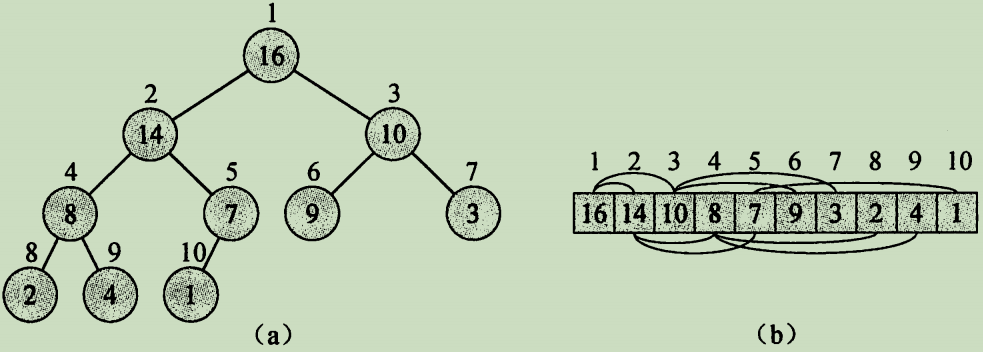
阅读算法导论之后做的读书笔记。在第二部分,第6章。
QT的全称就叫做QT。Qt 是一个1991年由Qt Company开发的跨平台C++图形用户界面应用程序开发框架。它既可以开发GUI程序,也可用于开发非GUI程序,比如控制台工具和服务器。
Qt是面向对象的框架,使用特殊的代码生成扩展以及一些宏,Qt很容易扩展,并且允许真正地组件编程。Qt支持下列操作系统: Microsoft Windows 95/98, Microsoft Windows NT, Linux, Solaris, SunOS, HP-UX, Digital UNIX Irix, FreeBSD, BSD/OS, SCO, AIX, OS390,QNX 等等。Qt 的良好封装机制使得 Qt 的模块化程度非常高,可重用性较好,对于用户开发来说是非常 方便的。并且Qt 提供了一种称为 signals/slots 的安全类型来替代 callback,这使得各个元件 之间的协同工作变得十分简单。
学习 nginx 相关的操作。资料都是来自于网络。
nginx 太常见于web开发的环境,这篇文章来记录一下如何使用这些东西。
Nginx 和 PHP 都是 Web 应用程序所需的组件,它们在 Web 应用程序的运行过程中起着重要的作用。
Nginx 是一个功能强大的 Web 服务器,可以作为静态 Web 页面、反向代理和负载均衡器使用。Nginx 的高性能和并发处理能力使其成为处理大访问量 Web 应用程序的理想选择。
PHP 是一种流行的服务器端编程语言,用于创建动态 Web 站点和 Web 应用程序。PHP 解释器将 PHP 代码解析为 HTML 和其他输出。通常,在 Web 服务器上,PHP 脚本使用 PHP-FPM(FastCGI 进程管理器)从 Web 服务器接收请求和响应。
因此,Nginx 提供了可以处理丰富的请求,使 Web 应用程序能够安全、高效地进行反向代理、负载均衡和静态页面服务。而 PHP 作为后端语言,能够与 MySQL 数据库等交互生成动态页面,并在请求中处理更复杂的业务逻辑,二者结合来处理 Web 请求,可以构建动态、高效、安全的 Web 应用程序。
1 | server { |
子目录无法访问的时候需要配置这句话:
1 | try_files $uri $uri/ index.html; |
当用户访问 /cosmos/bank/v1beta1/supply/acvnt 时,他们将被重定向到 /cosmos/bank/v1beta1/supply/by_denom?denom=acvnt。
如何使用nginx将 /cosmos/bank/v1beta1/supply/acvnt path 转换成 /cosmos/bank/v1beta1/supply/by_denom?denom=acvnt
http://13.228.177.196:1317/cosmos/bank/v1beta1/supply/by_denom?denom=acvnt
下面是一个 Nginx 配置文件的示例,用于部署静态网站并代理 API 请求。假设静态网站位于 /var/www/xxxx_backend/dist 目录,API 服务器运行在本地的 127.0.0.1:8888。
创建一个 Nginx 配置文件,例如 xxxx_backend.conf:
1 | server { |
在这个配置中,location / 部分用于配置静态网站,而 location /api/ 部分代理了所有以 /api/ 开头的请求到 http://127.0.0.1:8888/。其他配置部分可根据需要进行调整。
确保将该配置文件放置在 Nginx 的配置文件夹中,通常是 /etc/nginx/sites-available/,然后通过符号链接将其链接到 /etc/nginx/sites-enabled/,或者直接将配置内容添加到默认的 Nginx 配置文件中,具体取决于你的系统和配置。
完成后,重启 Nginx 以使更改生效:
1 | sudo systemctl restart nginx |
现在,你的静态网站应该可以通过 http://localhost:8080 访问,而 API 请求将被代理到 http://127.0.0.1:8888/api/。确保 Nginx 进程有足够的权限读取 /var/www/xxxx_backend/dist 目录下的文件。
1 | server { |
在 Nginx 中,日志输出本身并不直接支持循环日志(log rotation)。不过,你可以使用操作系统的日志管理工具(如 logrotate)来实现这一功能。
logrotate 实现 Nginx 日志轮替logrotate 是一个常用的日志管理工具,可以配置定期轮换、压缩和删除旧日志文件。以下是配置 logrotate 以支持 Nginx 日志轮替的步骤:
安装 logrotate
在大多数 Linux 发行版上,logrotate 通常已经安装。如果没有安装,可以使用包管理器进行安装:
Ubuntu/Debian:
1 | sudo apt-get update |
CentOS/RHEL:
1 | sudo yum install logrotate |
配置 logrotate
创建一个新的 logrotate 配置文件,或者修改现有配置文件,以支持 Nginx 日志轮替。
通常,logrotate 配置文件位于 /etc/logrotate.d/ 目录中。你可以为 Nginx 创建一个新的配置文件,例如 /etc/logrotate.d/nginx:
1 | sudo nano /etc/logrotate.d/nginx |
在文件中添加以下内容:
1 | /var/log/nginx/*.log { |
解释:
/var/log/nginx/*.log:指定需要轮替的日志文件。daily:每天进行日志轮替。你可以根据需要更改为 weekly 或 monthly。missingok:如果日志文件丢失,不会报错。rotate 14:保留14个轮替的日志文件。compress:压缩轮替后的日志文件。delaycompress:延迟压缩,直到下一个轮替周期。notifempty:如果日志文件为空,不进行轮替。create 0640 www-data adm:创建新的日志文件,并设置权限和所有者。sharedscripts:确保 postrotate 脚本只运行一次。postrotate 和 endscript:在每次轮替后发送 USR1 信号给 Nginx 主进程,以便 Nginx 重新打开日志文件。测试 logrotate 配置
在应用配置之前,测试 logrotate 配置是否正确:
1 | sudo logrotate -d /etc/logrotate.d/nginx |
如果没有错误,可以手动运行一次 logrotate:
1 | sudo logrotate -f /etc/logrotate.d/nginx |
确保 logrotate 定期运行
logrotate 通常由系统的 cron 服务定期运行。确保 cron 服务正在运行:
Ubuntu/Debian:
1 | sudo systemctl enable cron |
CentOS/RHEL:
1 | sudo systemctl enable crond |
通过以上步骤,你可以配置 logrotate 来实现 Nginx 日志的轮替管理,从而避免日志文件过大和管理上的问题。
CORS 问题;
在使用 Nginx 作为反向代理或静态服务器时,可以通过配置 CORS(跨域资源共享) 来解决跨域问题。跨域问题通常出现在浏览器的同源策略中,阻止不同域之间的请求。
为了让浏览器允许跨域请求,Nginx 可以在响应头中添加相关的 CORS 头信息,具体步骤如下:
打开 Nginx 配置文件
通常是 /etc/nginx/nginx.conf 或在你的网站配置文件中。
在需要处理跨域的 server 或 location 块中添加 CORS 相关配置。
1 | server { |
Access-Control-Allow-Origin:指定允许的跨域来源,可以设置为 * 允许所有域,或者指定具体的域名,如 https://example.com。Access-Control-Allow-Methods:指定允许的 HTTP 请求方法,如 GET, POST, OPTIONS 等。Access-Control-Allow-Headers:指定允许的自定义请求头,这对于处理带有 Authorization 或 Content-Type 的请求很有用。Access-Control-Allow-Credentials:允许跨域请求时携带 Cookies 或其他凭证。Access-Control-Max-Age:设置预检请求(OPTIONS 请求)的缓存时间,单位为秒,这样浏览器不需要每次请求都发送预检请求。OPTIONS 请求处理:当浏览器发出复杂跨域请求(比如带有自定义请求头或非简单的请求方法,如 PUT、DELETE)时,会先发出一个 OPTIONS 预检请求。Nginx 需要正确处理这些请求,并返回相应的 CORS 头。Access-Control-Allow-Origin: *,而是指定可信的域名,防止跨站攻击。1 | sudo nginx -s reload |
这样配置好后,Nginx 将能够正确处理跨域请求,解决浏览器的跨域限制。
你可以通过一个简单的 HTML 文件,在页面上放置一个按钮,点击后发送 POST 请求。由于浏览器不直接支持 curl,我们可以使用 JavaScript 的 fetch API 来代替 curl。然后,你可以使用 Python 的 http.server 模块在本地创建一个 Web 服务器来测试。
这是一个简单的 HTML 文件,包含一个按钮,点击按钮后会发送 POST 请求。
1 |
|
你可以使用 Python 3 的内置 HTTP 服务器在本地打开这个 HTML 文件,并在浏览器中测试跨域请求。
首先,保存上面的 HTML 代码到一个文件,比如 index.html。
然后,在同一目录下,运行以下 Python 命令:
1 | python3 -m http.server 8000 |
这将在本地启动一个 HTTP 服务器,并通过 http://localhost:8000 访问网站。
http://localhost:8000。POST 请求。如果服务器未正确配置 CORS,浏览器将阻止请求,通常会在控制台中看到类似以下错误:
1 | Access to fetch at 'https://your-domain-website.com' from origin 'http://localhost:8000' has been blocked by CORS policy: No 'Access-Control-Allow-Origin' header is present on the requested resource. |
你可以根据错误信息调整服务器配置(如 Nginx),确保 Access-Control-Allow-Origin 等 CORS 头信息正确返回。
POST 请求。package main
import (
“net/http”
"github.com/zeromicro/go-zero/rest"
)
func main() {
server := rest.MustNewServer(rest.RestConf{
Host: “0.0.0.0”,
Port: 8080,
}, rest.WithCors(“*”)) // 配置允许所有来源的跨域
defer server.Stop()

server.AddRoute(rest.Route{
    Method:  http.MethodGet,
    Path:    "/ping",
    Handler: func(w http.ResponseWriter, r *http.Request) { w.Write([]byte("pong")) },
})

server.Start()
}
在上面的示例中,rest.WithCors(“*”) 将会配置服务器允许所有源的跨域请求。您也可以根据需求自定义 CORS 设置,比如指定允许的来源或请求方法。
监控nginx的日志
1 | http { |